Category: Mondo Technicus

AI-based tools and assistants are changing the way we interact with data, code, and documentation on a daily basis. The Claude assistant (formerly known in workspace setups as Claude Cowork) is a powerful tool capable of analyzing, generating, and modifying files directly on your computer. However, running such automated assistants inside a protected “sandbox” environment …
Continue reading
Permanent link to this article: https://www.xenno.org/en/1721/how-to-create-a-secure-environment-for-claude-on-windows-wsl-best-practices-guide/
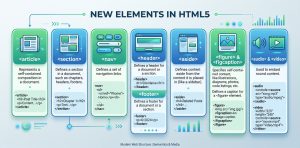
The internet has changed a lot since HTML 4.01 became a standard in 1999. Today, some elements in HTML 4.01 are obsolete, never used, or not used the way they were intended to. These elements are removed or re-written in HTML5. To better handle today’s internet use, HTML5 includes new elements for better structure, better …
Continue reading
Permanent link to this article: https://www.xenno.org/en/1169/new-elements-in-html5/

Windows equivalent : CuteFTP, SmartFTP Ubuntu equivalent : FileZilla FileZilla is free, open source, cross-platform FTP software, consisting of FileZilla Client and FileZilla Server. Binaries are available for Windows, Linux, and Mac OS X. It supports FTP, SFTP, and FTPS (FTP over SSL/TLS).
Continue reading
Permanent link to this article: https://www.xenno.org/en/836/graphical-ftp-clients-ubuntu/

Meta tags have never been a guaranteed way to gain a top ranking on crawler-based search engines. Today, the most valuable feature they offer the web site owner is the ability to control to some degree how their web pages are described by some search engines. They also offer the ability to prevent pages from …
Continue reading
Permanent link to this article: https://www.xenno.org/en/1111/description-meta-tag/

Windows equivalent : Adobe Photoshop, Paint.Net Ubuntu equivalent : GIMP Basic GIMP GIMP (GNU Image Manipulation Program) is a free software raster graphics editor. It is primarily employed as an image retouching and editing tool and is freely available in versions tailored for most popular operating systems including Microsoft Windows, Apple Mac OS X, and …
Continue reading
Permanent link to this article: https://www.xenno.org/en/842/image-editor-ubuntu/
Website content optimization have becoming common sense knowledge already, who doesn’t want a fast find site with engaging content? Did you found some terms about SEO-ing and you don’t know what they mean? Here is some detailed optimization techniques: Unique visitors A server hit is an HTTP request for a single web objective. One web …
Continue reading
Permanent link to this article: https://www.xenno.org/en/1057/website-optimization-techniques/

Recently I went into studying the jQuery scripts and I believe that these codes can be a start for anyone interested. Following are some order selectors and examples of their use with elements in the preceding code:
Continue reading
Permanent link to this article: https://www.xenno.org/en/1022/html-elements-attributes-and-positions-on-jquery/

Windows equivalent : 3D Studio MAX Ubuntu equivalent : Blender Blender is a professional-level 3D-modelling application, capable of helping you to produce photo-realistic results. It has many advanced features, and can handle the animation, rendering, post-production and interactive playback of your models.
Continue reading
Permanent link to this article: https://www.xenno.org/en/844/3d-graphics-applications-ubuntu/
Microsoft Visio is a diagram program for Microsoft Windows that uses vector graphics. An application program that replaces the open source operating system is DIA. Dia can be used to create several types of diagrams and flowcharts. She has special objects to make relationships between models (tedia2sql can be used to create SQL DDL), Unified …
Continue reading
Permanent link to this article: https://www.xenno.org/en/846/microsoft-visio-ubuntu/
Screenlets is the name of both a set of independently-developed widget applications and the widget engine which runs them. The engine runs primarily on X11-based compositing window managers, most notably with Compiz on Linux. Like Google Gadgets for windows. Installing sudo apt-add-repository ppa:screenlets/ppa sudo apt-get update sudo apt-get install screenlets
Permanent link to this article: https://www.xenno.org/en/848/screenlets-ubuntu/

Recent Comments